

Correction, September 23, 2026: we corrected the cache retention and cached-input discount figures. GPT-5.6 and later models also add explicit cache breakpoints and may charge for cache writes; see Microsoft's prompt caching guide.
Every API request to Azure OpenAI reprocesses the entire prompt from scratch, system instructions, tool definitions, few-shot examples, conversation history, regardless of how much has already been processed in prior requests. At low volume, acceptable. At scale, one of the largest avoidable latency issues and costs in your AI budget.
Azure OpenAI has the solution built in: prompt caching. The platform handles it automatically, the question is whether the application is engineered to take advantage of it.
How It Works
The prefill phase, where the model reads every input token and computes KV tensors, is the most expensive part of inference. Prompt caching exists to skip it entirely.
When a request arrives, Azure hashes the first ~256 tokens of the prompt and uses that as a routing hint toward a server that may already hold the relevant KV tensors in GPU memory. If they're there, it's a cache hit: prefill is skipped and generation starts immediately. If not, the full prefill runs and the result is cached locally on that machine for future requests.
Two conditions have to hold simultaneously for a hit to occur: the request routes to the right machine, and the tensors are still in its memory. Neither is guaranteed. KV tensors aren't shared across the server cluster, each machine holds its own. Which means server load, scaling events, and infrastructure rebalancing can all send a request somewhere cold. Cross-region routing carries the same risk: requests are far more likely to hit a warm cache within the same deployment region than across one. These are infrastructure-level factors outside your control.
What is partially in your control is cache longevity. In-memory cache entries are typically cleared after 5-10 minutes of inactivity and always within an hour of last use. Supported models can opt into extended retention of up to 24 hours, and GPT-5.6 and later use a 30-minute minimum TTL. Either way, consistent request cadence matters more than people realize. And enabling prompt_cache_key materially improves hit consistency by giving the router a stable, explicit signal rather than relying on hash inference alone.
The payoff: up to 80% lower time-to-first-token latency, discounted cached-input rates (90% off base input on recent GPT-5 models; check the model's price sheet), and on Provisioned Throughput deployments, cached tokens count 0% toward utilization, effectively free capacity.
On most models, caching is automatic. The question is whether your application is structured to trigger it.
Why Most Teams Miss It
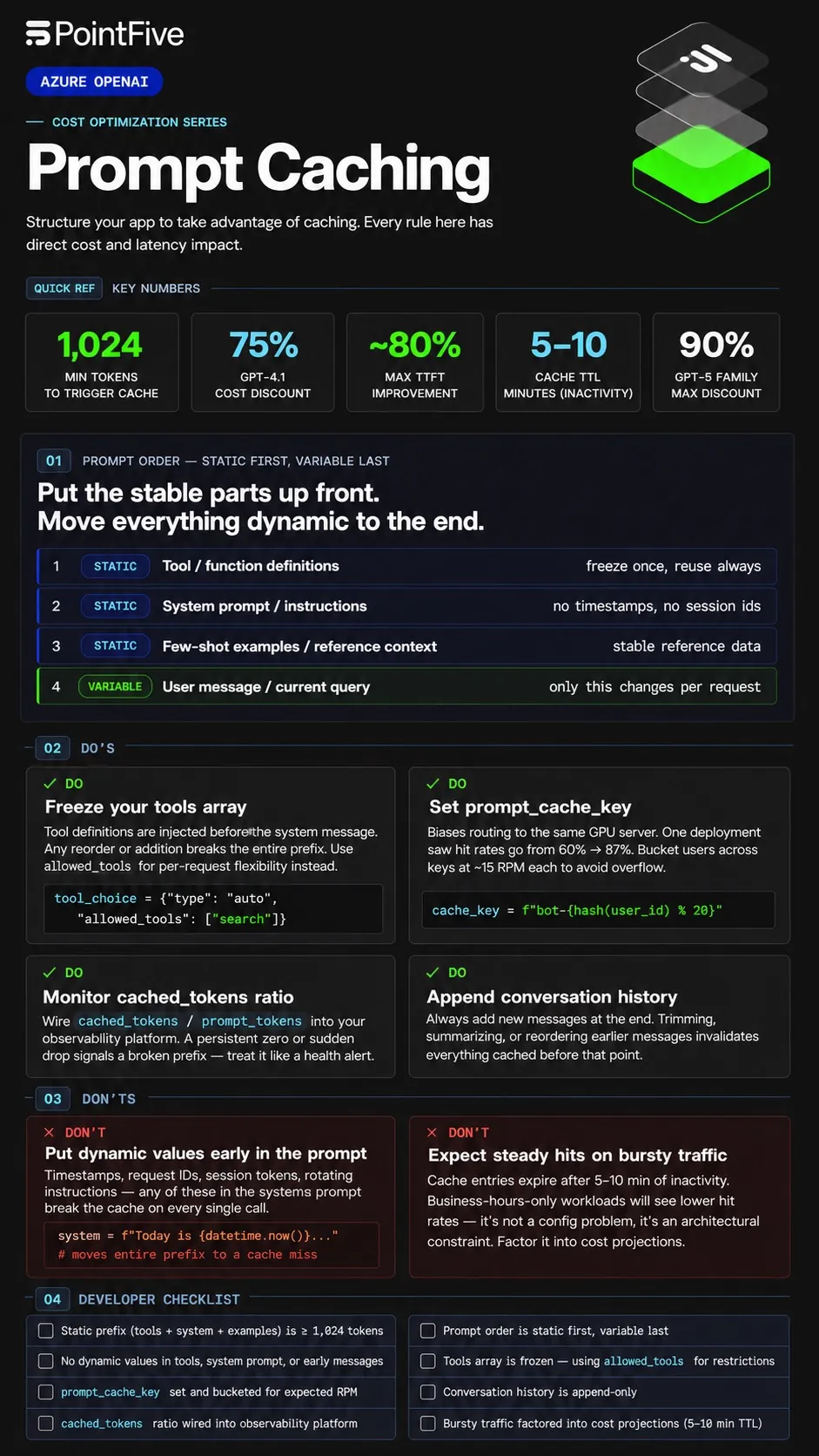
Caching only activates when at least 1,024 tokens match the start of a prior request. A single changed token anywhere in that prefix breaks the chain, full cache miss, from that point forward.
The most common culprits:
- Dynamic values injected early, timestamps, session tokens, request IDs in your system prompt invalidate the cache on every call
- Tool definitions that change between requests, Azure injects these before the system message; any addition, removal or reordering breaks the entire prefix
- Conversation history that gets trimmed, removing or reordering earlier messages resets everything cached before them
The efficiency loss is silent. Your LLM calls keep succeeding. Your bill quietly rises.
The Fixes That Actually Matter
Put static content first. Tool definitions to system prompt to few-shot examples to user message. The earlier dynamic content appears, the more prefix is invalidated every call. Most teams have this backwards.
Freeze your tools array. Per-request flexibility belongs in tool_choice.allowed_tools, not in the array itself. Changing the array changes the prefix.
Use prompt_cache_key. This parameter biases routing toward the same GPU server on repeat requests. One production deployment saw hit rates jump from 60% to 87% after adding it. prompt_cache_key has the most impact in high-traffic applications where many requests share the same prefix.
Append conversation history, never trim from the front. In multi-turn conversations, always add new messages at the end. Removing, summarizing, or reordering messages from earlier in the conversation changes the prefix and invalidates everything cached before it.
Monitor cached_tokens like a health metric. Every response surfaces usage.prompt_tokens_details.cached_tokens. Wire the ratio into your observability platform. A persistent zero means something structural is broken. A sudden drop means a recent change just killed your prefix.
What You Can't See, You Can't Fix
The structural changes above are knowable. The harder problem is detecting when you've regressed.
Prompt caching breaks silently. A deploy tweaks the system prompt. A debug timestamp gets left in production. None of this generates an alert. None of it surfaces in your Azure dashboard.
DeepWaste™ AI monitors this layer continuously, analyzing cache miss patterns, identifying models and services with underutilized native caching, and surfacing structural token waste across your Azure OpenAI workloads. No instrumentation. No code changes. When caching efficiency degrades, it shows up as a detected opportunity: quantified, prioritized, ready to act on.
Most teams find caching problems during cost reviews. DeepWaste™ AI finds them in production, before they compound.
Cache misses are avoidable. Invisible ones aren't.
See everything. Find savings others miss. Fix it without friction. Prove the impact.