

Every GCP environment we've analyzed has at least one Cloud Logging inefficiency.
Not most. Not the majority. All of them.
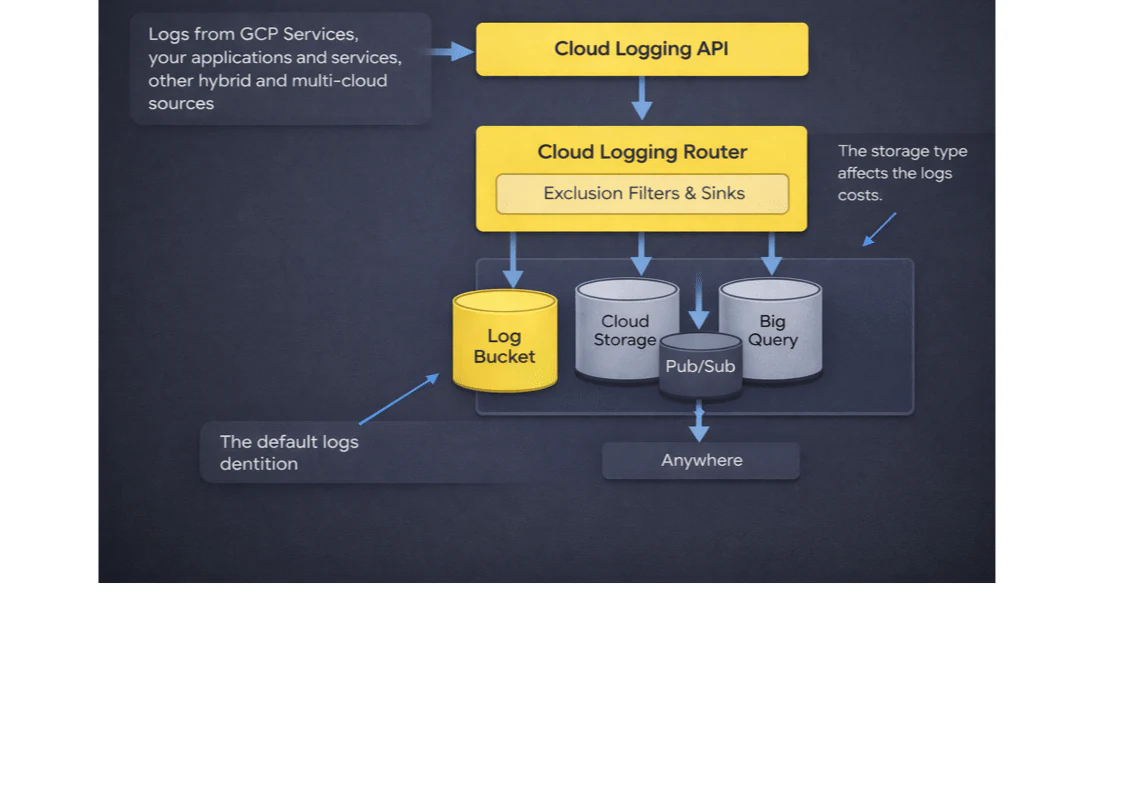
That's not a reflection of the teams running them, it's a reflection of how Cloud Logging works out of the box. GCP's default configuration routes everything to the most expensive destination, with no filters, no tier optimization, and no attribution back to the team generating the logs. The bill grows quietly. And because Cloud Logging sits between FinOps and Engineering, essential for debugging, alerting, and compliance on one side; increasingly expensive and poorly attributed on the other, nobody actually owns it.
Which is why it's one of the fastest-growing and least-scrutinized lines on the GCP bill. And why almost all of the waste is preventable.
The Inefficiencies We Find in Every GCP Environment
Across the environments we've analyzed, the waste consistently clusters into four patterns. Each one is caused by a default that made sense at setup and was never revisited.
Suboptimal GCS Storage Tier. A lower-cost class may suit infrequently accessed logs, but compare retention, retrieval, operations, and location costs before changing classes. A lower storage rate is not the same as a lower total workload bill.
Suboptimal Cloud Logging Architecture. Logs routed through a mix of organization-level and project-level sinks with no clear hierarchy. The same log stream ends up duplicated across centralized logging projects and local buckets, often with overlapping retention windows. Every copy is billed independently. At scale, this is the architectural version of leaving the lights on in every room.
Duplicate Storage of Logs. Custom sinks configured to route logs to BigQuery or GCS, while the _Default bucket sink was never disabled. Same logs, stored twice, billed twice, once at the default Log Ingest rate, once at whatever the custom destination charges. This is pure misconfiguration, and it's everywhere.
Info and GKE Logs in Non-Production. The quiet killer. Verbose logging turned on during development, never turned down. Health checks and load balancer noise running 24/7 at production volume in environments nobody's debugging. In the environments we've analyzed, this single pattern can drive 20-70% of total logging cost. It's the clearest case of high volume, low value, and the easiest to fix with an exclusion filter.
Why Your Bill, and Your FinOps Tool, Both Miss This
If these inefficiencies are so common, why don't teams catch them?
Because Cloud Logging's billing is built to obscure them. You pay $0.50 per GiB to ingest logs, with 30 days of storage in the default bucket included. Keep them longer and you pay a small monthly retention fee. Simple enough, until logs leave Cloud Logging. Export them to BigQuery for analytics, Cloud Storage for archival, or Pub/Sub for a SIEM, and each destination carries its own cost under its own service line, with no tag tying it back. A GCS bucket holding a year of application logs shows up on your bill as GCS. Not as logging. Not as the downstream cost of a misconfigured sink. Just GCS. The total cost of your logging isn't the number next to "Cloud Logging" on your bill, it's scattered across half a dozen services.
Most FinOps tools don't bridge that gap. They see the Cloud Logging bill exactly the way GCP presents it, a few SKUs, no bucket-level breakdown, no sink attribution, no tier optimization. They'll alert you that logging cost is going up. They won't tell you which sink is routing to the wrong destination, which bucket should be on a colder tier, or which _Default sink was forgotten three environments ago.
That's the difference between visibility and efficiency. Visibility tells you the bill is growing. Efficiency tells you which lines on which configs to change, and how much you'll save when you do.
The Math Behind the Optimal Fix
Catching the pattern is one thing. Recommending what to actually do about it is harder, because the cheapest tier per GiB per month is almost never the cheapest total cost.
The appropriate class depends on retention and access. Google Cloud storage-class documentation describes minimum storage durations, retrieval charges, and operational tradeoffs. Estimate the complete cost for the actual bucket location and access pattern using current prices and applicable contract terms. Sources checked September 17, 2026.
That's not a spreadsheet problem. That's an algorithm problem, run against live data, every night.
Logging is usually the largest line of any observability bill, in the cloud provider or in a commercial APM. If that bill keeps growing, it is also worth reviewing the tools themselves; see our guide to open-source APM alternatives.
How PointFive Solves It
That's the work running under the hood at PointFive.
The DeepWaste™ engine evaluates every bucket against every tier and every region simultaneously, using your actual observed billing. It runs the full cost function, storage plus network plus retrieval, subject to the retention you actually require, and surfaces the optimal answer. Not the cheapest tier. The lowest total cost.
What you see is the output: the right tier, the right region, the projected monthly savings, and a remediation playbook ready to push to Jira. No agents. No performance impact. It uses data GCP already gives you.
The complexity stays out of your way. The savings don't.
Watch the webinar: Taylor Houck and Yuval Goldstein walk through the 4 most common Cloud Logging inefficiencies, detected live on a real GCP environment.