
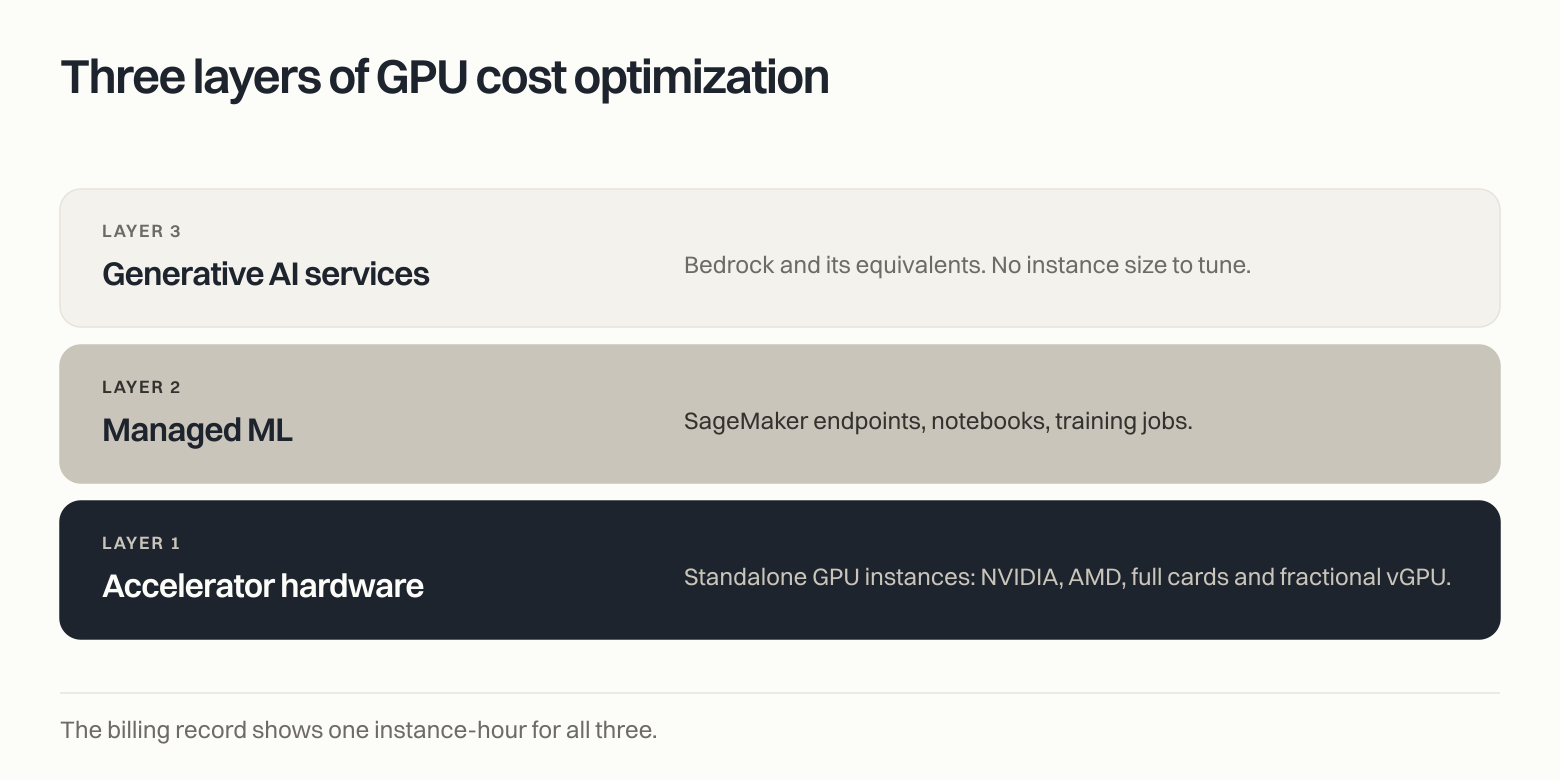
GPU cost optimization is the practice of finding and removing waste in AI infrastructure across three layers: the accelerator hardware, the managed ML services running on it, and the generative AI services above that. It is not the same discipline as CPU rightsizing. The signal you need to do it is absent from your cloud bill and switched off by default on your instances.
Every company I talk to now has an AI line on the infrastructure bill. Almost none of them can tell me what the money is actually delivering. It is a measurement problem, and it is worse than most teams realize.
Correction, September 23, 2026: this post previously said the State of FinOps 2026 named AI cost management as the top skillset teams want to add; the survey names AI value management.
What is GPU cost optimization?
Most people hear "GPU optimization" and picture rightsizing. Find the oversized instance, move it down a size, book the savings. That instinct works for CPU. It misses most of the money in AI. GPU cost optimization runs across three layers, and they behave nothing alike.
| Layer | What it covers | Where the waste hides |
|---|---|---|
| Accelerator hardware | Standalone GPU instances: NVIDIA, AMD, full cards and fractional vGPU | Idle instances, oversized cards, reserved capacity billed with nothing running in it |
| Managed ML | SageMaker endpoints, notebooks, training jobs | Inactive endpoints, always-on notebooks, GPU endpoints that would run fine on CPU, endpoints that belong consolidated behind one multi-model endpoint |
| Generative AI services | Bedrock and its equivalents | Missing prompt caching, expensive models on low-complexity tasks, excessive cross-region inference, underutilized provisioned throughput, guardrail overhead |
Layer one is the literal GPU problem. The accelerator dominates the cost, so an idle GPU box carries a large premium even when the host looks quiet. At roughly $55 an hour on demand, a single p5.48xlarge left running bills about $40,000 a month to do nothing.
Layer two is where endpoint sprawl accumulates. Managed ML endpoints get provisioned for peak, pointed at hardware the model does not need, and then outlive the project that created them.
Layer three has no instance sizes to tune at all. The levers are configuration: what you cache, which model you route to, where inference runs, how much throughput you committed to.
Teams that only work layer one leave most of the money on the table. Across the fleets we monitor, managed ML and generative AI services account for most open GPU and AI findings. Standalone accelerator findings are lower-volume but often carry high per-resource costs.
Why is GPU cost optimization urgent in 2026?
Worldwide AI spending will reach $2.59 trillion in 2026, up 47 percent year over year, according to Gartner, Inc. (Gartner Forecasts Worldwide AI Spending to Grow 47% in 2026, 19 May 2026).
The optimization discipline is arriving late behind it. In the FinOps Foundation's State of FinOps 2026, 98 percent of respondents to the AI-spend question said they manage AI spend, up from 31 percent in 2024. The survey included 1,192 participants overall, while 693 answered this question. FinOps for AI is the top forward-looking priority, and AI value management is the number-one skillset teams want to add through people or tooling. Waste is going the wrong way at the same time. Flexera's 2026 State of the Cloud Report puts wasted cloud spend at 29 percent of IaaS and PaaS spend, the first rise after five years of decline.
Pricing is also a problem again. AWS cut on-demand and Savings Plan prices on P4 and P5 instances by up to 45 percent in mid-2025. Reserved capacity moved the other way. Capacity Block pricing increased in several separate updates. P5e and P5en rates rose roughly 15 percent in January 2026. An April update raised commercial-region P6-B200 and US-region P5en rates by about 10 percent. On July 1, many commercial-region rates rose roughly 20 percent across P4de, P5, P5e, P5en, P6-B200 and P6-B300, with regional exceptions. An AWS spokesperson told The Register the January move "reflects the supply/demand patterns we expect this quarter." AWS said so itself in the very announcement that cut those prices: "The growth in demand for GPU capacity has outpaced industry-wide supply, making GPUs a scarce resource and increasing the cost of securing them."
The bill is compounding, the hardware is scarcer, and the CFO has started asking what came back. PwC's 29th Annual Global CEO Survey found 56 percent of CEOs report no significant financial benefit from AI investment to date.
Why is GPU cost optimization so hard to do on your own?
Explaining it is easy. Doing it is not.
The GPU signal is off by default
The AWS/EC2 namespace ships exactly one accelerator metric: GPUPowerUtilization, added in October 2025. It measures power draw, not work, and AWS documents only that it is "supported on a subset of accelerated computing instance types" without publishing which ones.
Actual GPU utilization and memory require you to install the CloudWatch agent with an NVIDIA driver, on Linux. On AMD GPU instances there is no AWS collector at all. The only signal is the amdgpu sysfs interface, which you scrape yourself.
Most fleets have none of this turned on. The optimization work has not failed. It has never started.
The metric everyone trusts is not measuring work
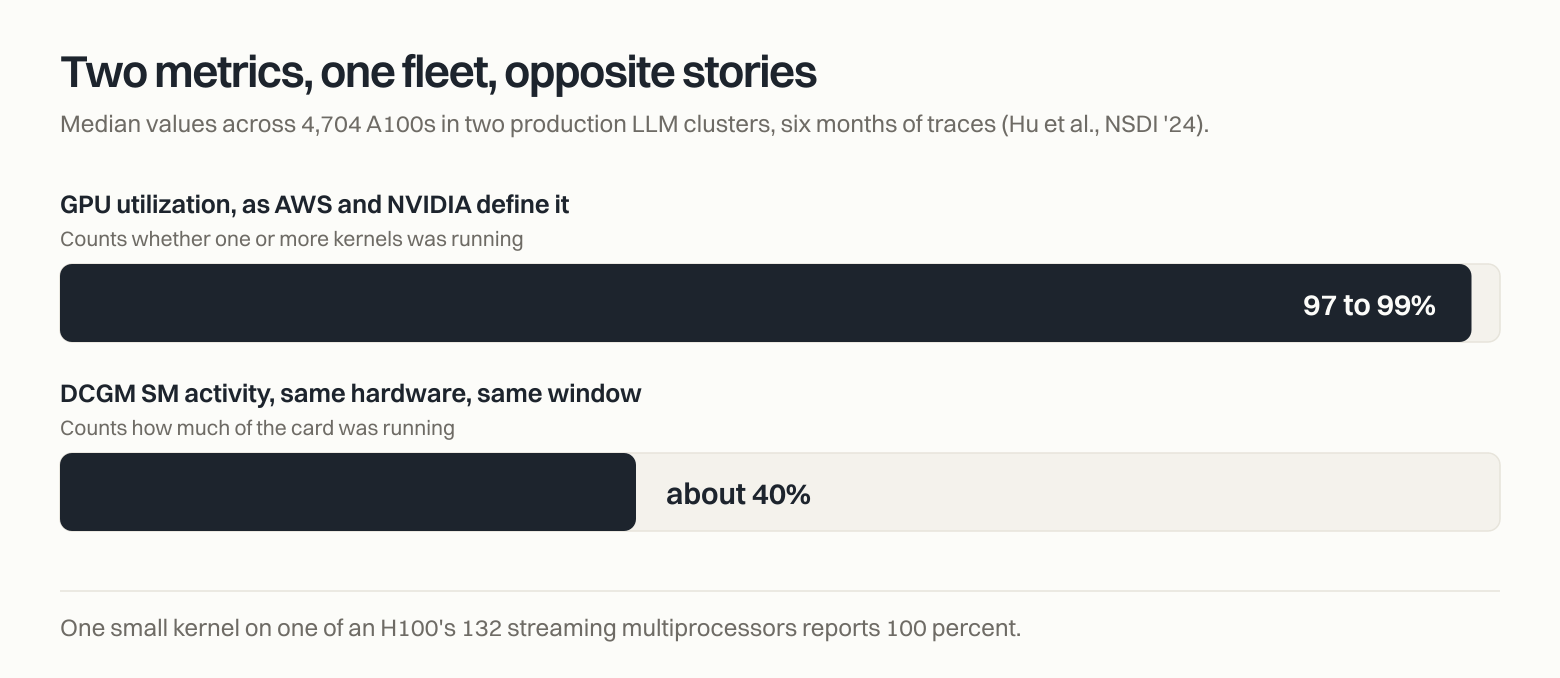
Here is AWS's own definition of GPU utilization, verbatim: "The percentage of time over the past sample period during which one or more kernals [sic] on the GPU was running." NVIDIA's NVML documentation says the same thing about the field underneath it.
It counts whether anything ran, not how much of the card ran. One small kernel occupying a single streaming multiprocessor out of the 132 on an H100 SXM reports 100 percent.
The gap has been measured. A six-month study of two production LLM clusters at Shanghai AI Laboratory, 4,704 A100s in total, traced from March to August 2023 and published at NSDI '24, put median GPU utilization at 97 to 99 percent and median DCGM SM activity on the same hardware at roughly 40 percent. Two metrics, one fleet, opposite stories.
Your cloud bill cannot see whether the accelerator worked
Cost Explorer and the Cost and Usage Report are billing systems. A p5 running a 405-billion-parameter training step and a p5 sitting at zero are byte-identical in the billing record. Both show one instance-hour.
Even AWS's most GPU-aware billing feature inherits the problem. Split Cost Allocation Data for EKS exposes accelerator actual usage and reserved usage separately, while allocating cost using the greater of the two. It can therefore reveal low observed usage, but it still does not measure GPU compute efficiency or whether the workload delivered business value.
Any tool whose only input is billing data hits this wall. It is structural, not a product gap.
The native tooling has documented gaps
Trusted Advisor's low-utilization check fires on CPU at or below 10 percent and network I/O at or below 5 MB, on at least 4 of the previous 14 days. The word GPU does not appear anywhere on that page, and the recommended action is to stop or terminate the instance.
Compute Optimizer goes further, and its limits are specific. Its GPU analysis depends on that same agent install and reads that same weak metric. Its idle criteria for G and P instances require all five conditions to hold across a 14-day window, including GPU inactive for more than 99 percent of the period and GPU memory below 5 percent. A GPU box doing nothing with a model still resident in memory never trips it. And by AWS's own supported-instance rule, Compute Optimizer produces no rightsizing recommendations for G4ad, the P6 Blackwell families, Trainium, Inferentia, or any Spot instance. That excludes the newest and most expensive GPU capacity AWS sells, plus the purchasing mode ML training leans on hardest.
One distinction is worth making, because it cuts the other way. Every exclusion above is rightsizing-specific. Idle detection is a separate code path and a better story: Compute Optimizer does generate idle recommendations for EC2 Auto Scaling groups running G and P instances, and for SageMaker endpoints with zero invocations over a 14-day lookback. That second one needs no agent and no GPU metric at all, which makes it the most useful native check on this list.
A wrong termination costs more than the waste
Meta reported 466 job interruptions during a 54-day Llama 3 pretraining window, on a cluster where one GPU failure can force a restart of the whole job. A node you release is a node that can fail the same way, except this time you chose it. AWS returns InsufficientInstanceCapacity even when you restart a stopped instance. Capacity Blocks are charged upfront and are not refundable. On-demand Capacity Reservations bill whether you run instances in them or not.
Now look at the payoff matrix facing the engineer who owns that fleet. Modest savings if they release capacity. Catastrophic loss if the call was wrong. A real chance they cannot get the hardware back at all. Hoarding is the rational response, and no dashboard is going to argue them out of it.
Which is why "delete the idle instance" is the wrong remediation for GPUs even when the idleness call is correct.
How does PointFive detect GPU and AI waste?
GPU and AI detections live in the same Cloud & AI Efficiency catalog as the rest of the estate, and they follow four rules.
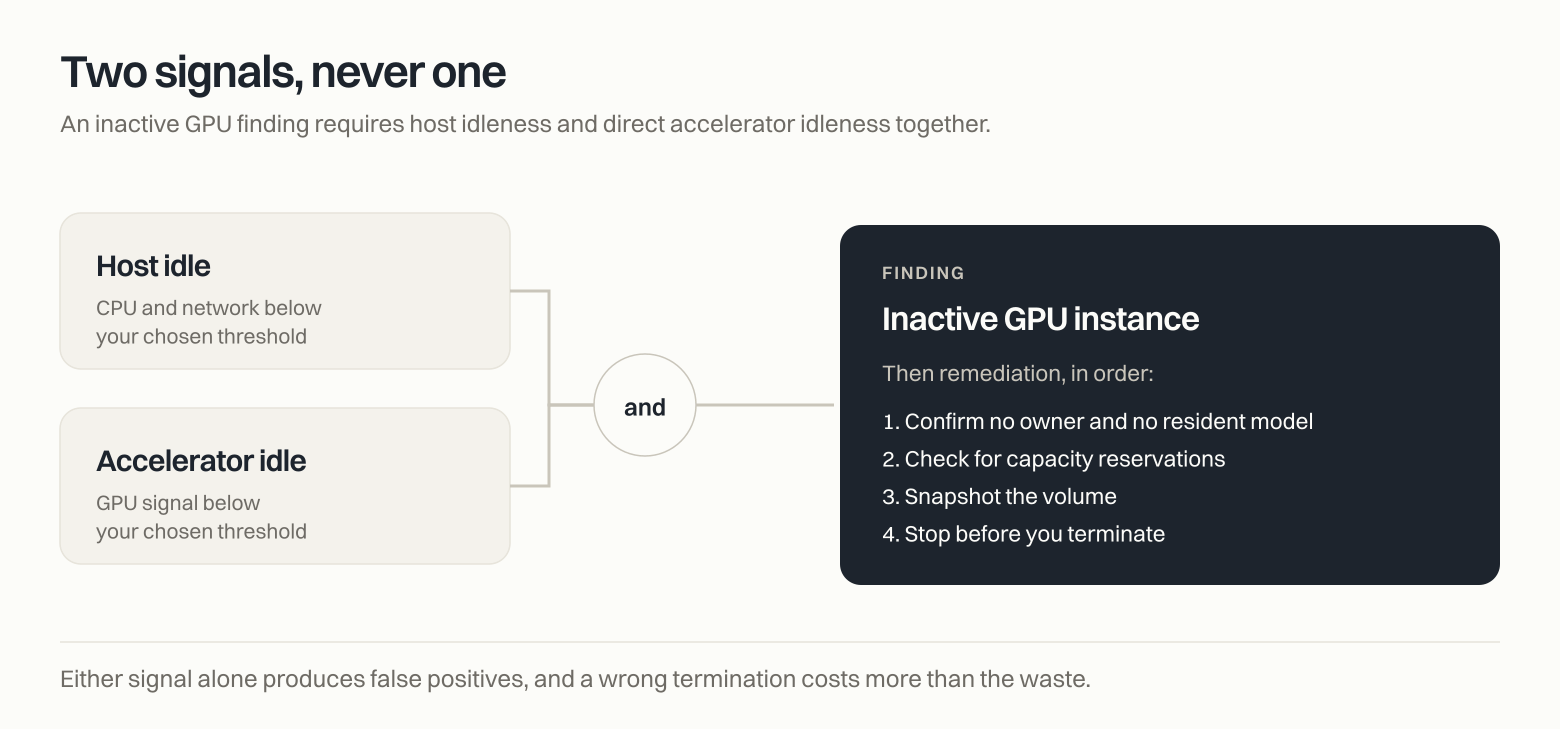
Two signals, never one. An inactive GPU finding requires host idleness and direct GPU idleness together, never one alone. Where richer telemetry exists we use it. Where it does not, we say so: the AMD detection strictly requires AMD GPU telemetry with no host-only fallback, because a host-only verdict on an AMD box is a guess with a percentage next to it.
Conservative defaults, tunable by the customer. Lookback from 7 to 90 days. Evaluation statistic from average through P99 and max. CPU, network, and GPU thresholds all adjustable. A shared dev cluster and a production training fleet should not clear the same bar.
Remediation that respects the blast radius. Confirm there is no owner and no resident model. Check for capacity reservations. Snapshot the volume. Stop before you terminate. The fix is delivered as a pull request with validation evidence attached, ready for engineering review and approval.
All three layers in one catalog. Idle and oversized accelerator instances. Inactive and underutilized SageMaker endpoints, always-on notebooks, GPU endpoints that fit on CPU, endpoints that should be consolidated. Then the Bedrock layer: missing prompt caching, expensive models on low-complexity tasks, excessive cross-region inference, underutilized provisioned throughput, guardrail overhead. These sit alongside hundreds of optimization types spanning cloud, Kubernetes, data and AI services, which is the point of putting them in one catalog rather than a separate AI tool.
We are also specific about the edges, because nobody should buy a detection catalog on adjectives. Every example in this post is AWS, where the telemetry gaps are documented and we can show our work. Neuron-based accelerators are in progress. And we read GPU power draw as a coarse proxy rather than DCGM SM activity, which is exactly why an inactive verdict needs two independent signals and why remediation asks for human confirmation instead of claiming a certainty the telemetry does not support. A coarse signal is safe when it is gated, and dangerous when it is not.
Deeper detail on the detection engine is in DeepWaste™ detection, the AI-specific coverage is on AI cost optimization, and the research behind findings like these is published by PointFive Labs.
Start with the layer that is already costing you
If you do one thing this quarter, go find every inference endpoint and notebook in your account that has served nothing for two weeks. No new tooling required. Compute Optimizer's idle recommendations will hand you most of the endpoints, and it is one of the fastest places to capture savings.
Then ask the harder question. For every GPU instance you are paying for, what evidence do you have that the accelerator did work? If the answer comes from your bill, you do not have an answer. The billing record says the instance ran. The native metric reports relative GPU power consumption, while commonly used GPU-utilization metrics report whether kernels were executing. Neither proves that the accelerator was being used efficiently.
Book a demo to see the two-signal evidence for your own accelerators.
Frequently asked questions
What counts as an idle GPU instance?
A defensible idle call needs two independent signals: the host is quiet on CPU and network, and the accelerator itself shows no work over the same window. Either signal alone produces false positives. A GPU box can look busy on CPU while the card does nothing, and a card can be genuinely idle while a resident model holds memory.
Does AWS give you GPU utilization metrics by default?
No. The AWS/EC2 namespace contains one accelerator metric, GPUPowerUtilization, which measures power rather than work and covers an unpublished subset of instance types. NVIDIA GPU utilization and memory metrics require the CloudWatch agent plus an NVIDIA driver on Linux. There is no AMD collector in the agent at all.
Can AWS Compute Optimizer rightsize GPU instances?
Partly. It analyses GPU utilization, GPU memory, and encoder metrics, but only if you installed the CloudWatch agent first. Its supported list excludes G4ad, the P6 Blackwell families, Trainium, Inferentia, and all Spot instances, and by AWS's stated rule an unlisted instance type gets no recommendation. Idle recommendations are broader than rightsizing: they do cover G and P Auto Scaling groups and SageMaker endpoints.
Why can't cloud cost tools find GPU waste?
Because billing data has almost no utilization in it. An idle GPU instance and a saturated one generate identical line items. Standard EC2 billing records can tell you what a GPU cost, but not whether the accelerator performed useful work. EKS Split Cost Allocation Data is a limited exception because it includes accelerator actual and reserved usage, although it still does not measure GPU compute efficiency.
Should you terminate an idle GPU instance?
Not as a first move. GPU capacity is scarce, InsufficientInstanceCapacity can hit you when restarting a stopped instance, and a wrongly killed node can restart a multi-day training job. Confirm ownership, check for a resident model, check for capacity reservations, snapshot, then stop before you terminate.
Where is the fastest GPU and AI saving to capture?
Managed ML is often one of the fastest places to capture savings because inactive endpoints and always-on notebooks are comparatively easy to identify and remediate.
Sources: Gartner Forecasts Worldwide AI Spending to Grow 47% in 2026, 19 May 2026 / FinOps Foundation State of FinOps 2026 / Flexera State of the Cloud 2026 / PwC 29th Annual Global CEO Survey / AWS CloudWatch NVIDIA GPU metrics / AWS EC2 CloudWatch metrics / NVIDIA NVML utilization reference / Hu et al., NSDI '24 / AWS Compute Optimizer supported resources / AWS Compute Optimizer idle recommendations / AWS split cost allocation for accelerated instances / AWS Capacity Blocks pricing and billing / AWS EC2 Capacity Blocks pricing / AWS GPU price reduction, June 2025 / The Register on the January 2026 increase / Meta, The Llama 3 Herd of Models